✈️ Aircraft Data on FL3XX API
Learn how to configure aircraft data access through the FL3XX API by enabling the publishing setting for specific aircraft. By default, the FL3XX API does not have access to any aircraft data for security reasons.
Enable Aircraft API
By default, the FL3XX API does not have access to any aircraft data for security reasons. Each aircraft must be explicitly configured to be accessible through the API.
Enable Aircraft API
Configure aircraft for API publishing
To publish aircraft data via API endpoints, you need to configure each aircraft individually in the FL3XX Aircraft module.
Access Aircraft Module
Navigate to the FL3XX Aircraft module in your FL3XX dashboard.
Select Target Aircraft
Select the aircraft that you want to make available through the API. Choose carefully based on your integration requirements.
Navigate to Integrations
On the selected aircraft page, go to General > Integrations to access the API settings.
Enable API Publishing
Set "Publish on FL3XX API" to enable this aircraft’s data for API access.
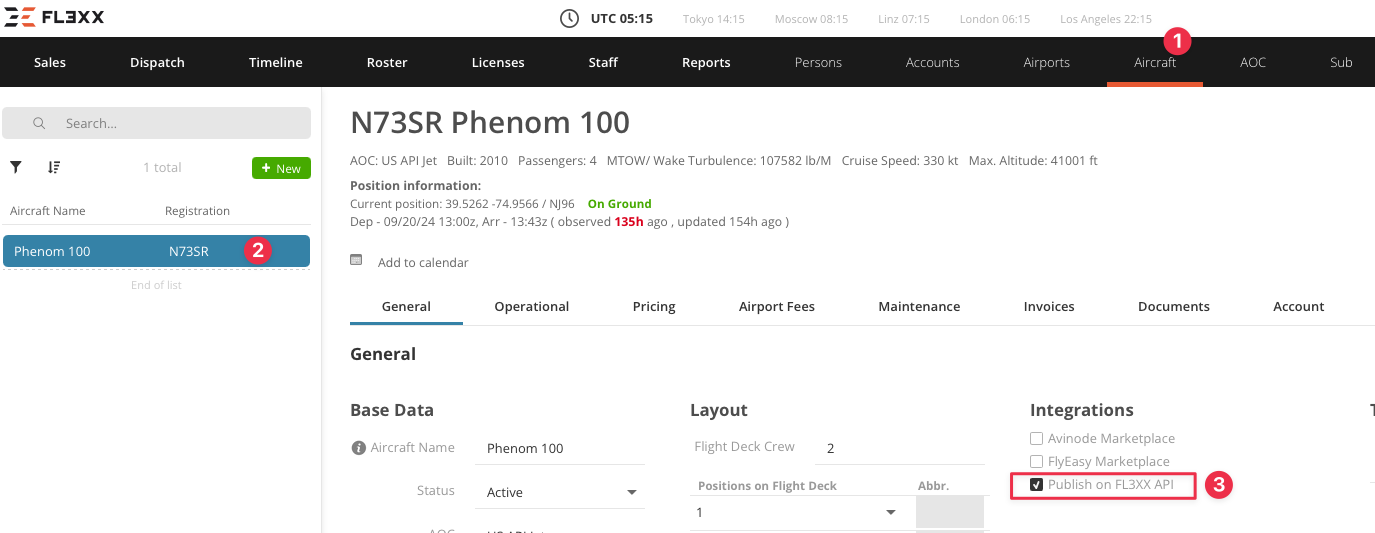
API Publishing Setting
The "Publish on FL3XX API" setting is the key control that determines whether an aircraft’s data will be accessible through external API endpoints. This includes schedule data, availability information, and other operational details.