⚙️ Settings for Accounting
Configure FL3XX accounting integration settings to control how bookings are flagged and processed for financial systems
Integration Settings
Manual Ready to Invoice
Automatic on Confirmation
Integration Settings
Access accounting configuration options
Admin system access is required to enter the FL3XX integration settings. These settings control how bookings are flagged for accounting processing.
🧭 Navigation Path
- Click your name in the top‑right corner of the screen.
- Select Settings.
- Go to Integrations.
- Open External Accounting to reveal its settings.
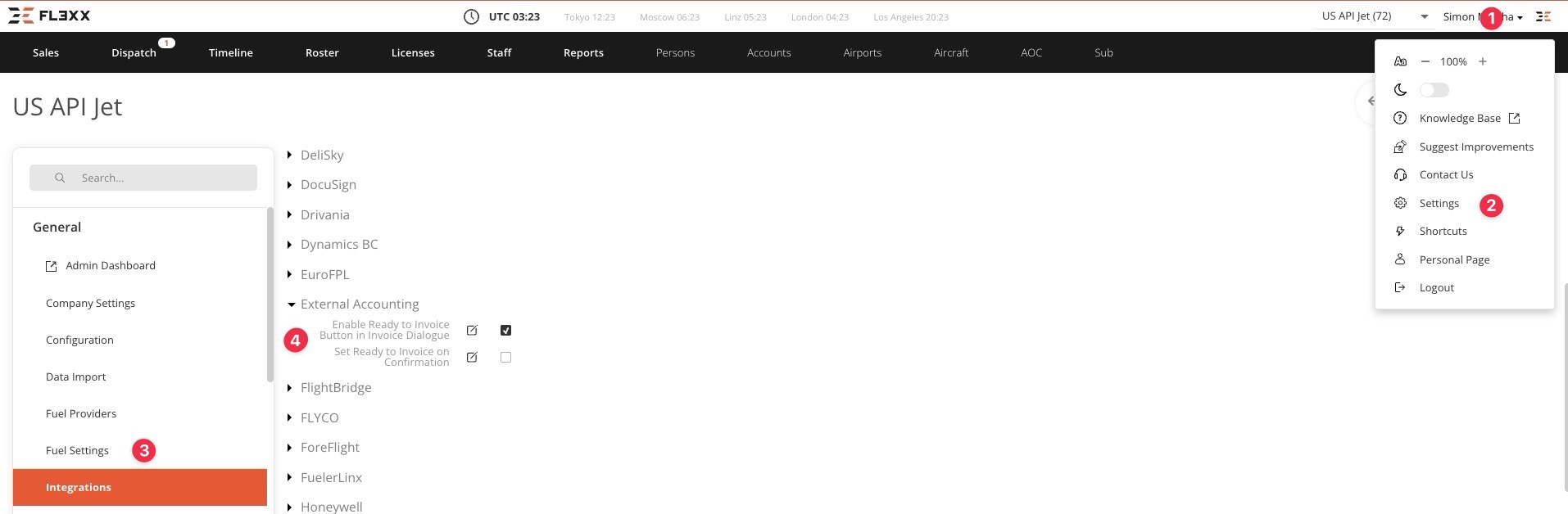
Available Configuration Options
1. Enable “Ready to Invoice” Button in the Invoice Dialog
Add a manual control to the invoice dialog that allows users to flag bookings as ready for accounting processing.
2. Set “Ready to Invoice” on Confirmation
Automatically flag bookings as ready for accounting when they are confirmed, streamlining the workflow.
💡 Understanding “Ready to Invoice”
“Ready to Invoice” is a flag set on a booking when it is time to expose it to finance. Operators may receive thousands of quote requests and process hundreds of quotes that are irrelevant for finance because they are never confirmed. Only relevant business cases should be flagged as “Ready to Invoice.” Your application can then fetch these bookings and process them according to your workflow.
Manual Ready to Invoice
Flag bookings manually for accounting
Automatic on Confirmation
Auto-flag bookings when confirmed